How to Redeem Codes in World // Zero
Exact menu path, Claim tips, and fixes when a code fails so you never lose Kraken Coins or Crystals.
Before you start
Promo codes in World // Zero Anime RPG are claimed inside the live Roblox experience — not on the website and not through Discord bots. You need an active session on your Roblox account, a working internet connection, and the current active strings from the Codes Hub. This guide walks through the redeem UI, explains every common error message, and shows how the Roblox group inventory bonus fits alongside codes.
If you just installed the game, skim Getting Started first so you know how to open menus and reach a safe lobby. Codes still work mid-dungeon for many accounts, but redeeming from a town or hub screen avoids accidental disconnects while a reward toast is open.
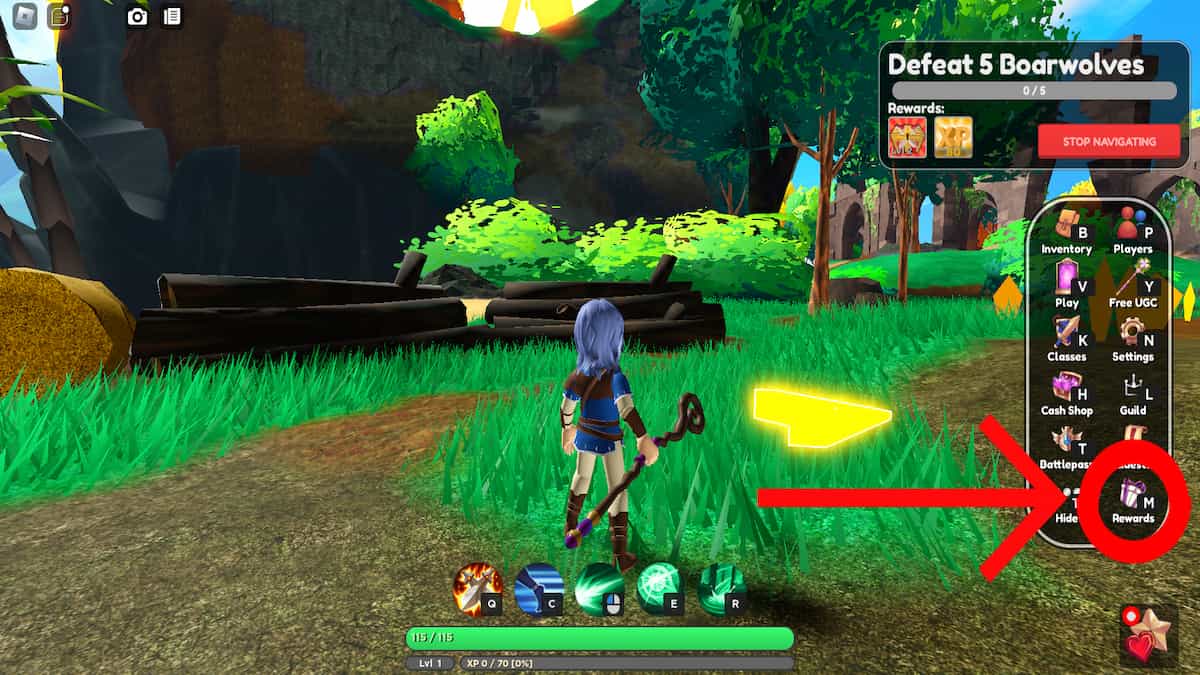
Exact redeem path (Tab → Rewards → Claim)
- Launch World // Zero Anime RPG from Roblox and wait until your character loads into the world.
- Press Tab on keyboard (or open the equivalent menu button on touch / controller bindings your client uses).
- Select Rewards from the menu list. This panel holds daily / event claims and the promo code field.
- Click or tap the code entry box. Paste one code at a time — for example
KRAKENINSANE,YARRR, or925KLIKESfrom the active list. - Press Claim. Wait for the confirmation toast listing Kraken Coins, a Summer Present, Crystals, or other items.
- Open your inventory or currency HUD to confirm the rewards landed, then redeem the next code.
Always paste with exact capitalization. World // Zero codes are published in all caps. Extra spaces before or after the string are the number-one reason a valid code looks “broken.”
Active codes to try after reading this
Keep the Codes Hub open in a second tab while you redeem:
KRAKENINSANE— 25 Kraken Coins + Summer Present (NEW)YARRR— 25 Kraken Coins + Summer Present925KLIKES— 150 Crystals
Kraken Coin codes matter most during the Kraken Summer Event, when Kraken Cove, The Depths, and Insane Mode are live and double XP runs through about September 28, 2026. Crystals from 925KLIKES are evergreen account value — decide spends with the Tier List if you are choosing a class direction.
Roblox group slots (do this once)
Joining the official World // Zero Roblox group grants +10 inventory slots and +20 bank slots. That bonus is not a promo code. You claim it by joining the group on Roblox, then relaunching or refreshing the experience so the server applies the perk.
Why it matters for redeeming:
- Summer Presents and dungeon loot need free bag space.
- Event shops dump cosmetics and materials that otherwise bounce or force vendor trips.
- Bank slots keep seasonal leftovers safe when the next update lands.
Find the group and other official destinations on Official Links. Stay in the group if you want to keep the slot bonus.
Troubleshooting failed redeems
“Invalid” or “does not exist”
- Re-copy from the Codes Hub — do not retype from memory.
- Confirm the code is still in the active table. Expired examples include
KRAKEN26,SUMMER26,SUMMERHYPE,VANE26,ANIME26,PRIDE26,900KLIKES, andHEAVENRAID. - Remove spaces, line breaks, or hidden characters from mobile clipboard managers.
“Already redeemed”
Codes are generally one claim per Roblox account. Alts need their own session and their own redeem. If you share a PC, make sure you are logged into the correct Roblox user before pasting.
No reward toast / UI freeze
- Close and reopen the Rewards panel.
- Rejoin the server once; soft desyncs happen during busy event weekends.
- Check currency counters and inventory after rejoin — sometimes the grant applied without a visible toast.
Rewards missing after a successful Claim
- Look in mail / temporary reward storage if your client version uses one.
- Confirm inventory is not full; join the Roblox group for extra slots, clear junk, then reclaim only if the game allows a retry (most codes will not).
- After major patches, skim Updates for known reward bugs.
Mobile, console, and controller notes
Roblox clients differ by platform, but the logical path stays the same: open the in-experience menu → Rewards → paste → Claim. On mobile, use the on-screen menu button that mirrors Tab. On controllers, open the radial / pause menu mapped to your device, then navigate to Rewards with the stick and confirm with the face button.
Paste can be awkward on some mobile browsers. Workarounds:
- Type the short codes carefully in all caps.
- Paste from Roblox’s supported clipboard flows if your OS allows it.
- Redeem on PC first if you own multiple devices on the same account — rewards are account-bound, not device-bound.
Smart order of operations on event weeks
- Join the Roblox group for inventory / bank slots (Official Links).
- Redeem all active codes from the Codes Hub.
- Open Summer Presents when you have space.
- Spend Kraken Coins in the seasonal shop before the event ends — see Kraken Summer Event.
- Plan Crystal spends with Tier List and your Getting Started progression goals.
- Farm double XP windows instead of sitting in the lobby after claiming.
Avoid stacking risky client tools just to “auto claim” codes. Redeem is a short manual action; the ban risk outlined on Scripts is not worth it for a paste field.
Staying current without refreshing rumor sites
- Revisit the Codes Hub after every milestone or seasonal post.
- Follow patch write-ups on the Updates Hub.
- Watch the official X account and Discord linked from Official Links.
- Ignore unverified strings that never appear in Twin Atlas channels or this wiki’s active table.
When a code expires, we move it to the expired section on the hub so this redeem guide never encourages dead claims. If Claim suddenly fails for a code that was working yesterday, assume an overnight expiry and check Updates the same day.
Related pages
- Codes Hub — active and expired lists
- Kraken Summer Event — spend Kraken Coins and Summer Presents
- Updates Hub — patch and event tracker
- Getting Started — early-game checklist after rewards
- Tier List — prioritize Crystal value
- Official Links — Discord, X, Roblox group, Twin Atlas
Frequently Asked Questions
Quick answers players ask every week.
Where is the code redeem box in World // Zero?
Press Tab to open the menu, open Rewards, paste the code into the field, then press Claim. Mobile and console use the same Rewards panel through their menu button.
Can I redeem the same code on multiple accounts?
Each Roblox account can usually redeem a given code once. Log into each alt separately and repeat Tab → Rewards → Claim.
Do codes work during a dungeon run?
Many players redeem from town or hub to avoid disconnects, but the Rewards panel is available in-experience. If the UI lags mid-fight, finish the run and claim in a safe area.
What do I get from joining the Roblox group?
The official group grants +10 inventory slots and +20 bank slots. It is separate from promo codes and helps store Summer Presents and dungeon loot.
A code from social media failed — what now?
Compare it to the active table on the Codes Hub. Expired 2026 strings like SUMMER26 or 900KLIKES no longer work even if old posts still circulate.
Should I redeem Kraken codes before the event ends?
Yes. Kraken Coins and Summer Presents are seasonal. Claim KRAKENINSANE and YARRR early, then spend coins while Kraken Cove and Insane Mode are live.